
~ Staff management, without the chaos.
You have a moderation team. Someone gets promoted. Now you have to remember which four roles to add, which two to remove, whether they get @Ticket Access role yet, and whether the @Raid Alert role goes on at @Moderator or @Senior Moderator. After the promotion, you have to also DM the user to let them know. Rinse-and-repeat for the next person. Sounds like a chore.
How it works
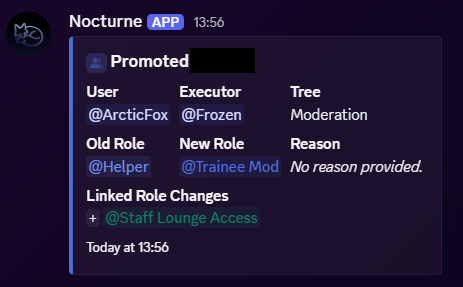
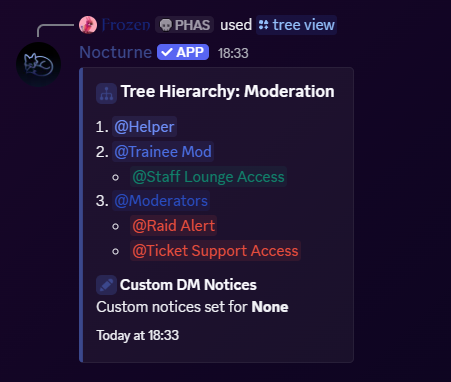
Nocturne is built around trees which are structured ladders/departments you define once. At every position, there is a base role and any number of linked roles attached to it. When someone moves up or down that ladder, Nocturne handles everything.
- Hire someone: every role they need, assigned instantly.
- Promote them: old roles stripped, new ones applied.
- Fire them: everything gone. Clean slate.
No checklists. No “wait, did anyone give them the ban-perms role?” moments. No accidental admin role grants because Discord’s UI is just bad.
What you get
-
Promotional trees
Build as many trees as your server needs. Moderation, Support, Events: each one is its own independent hierarchy with its own roles and linked roles. -
One-command actions
/staff hire,/staff promote,/staff demote,/staff fire. Each command handles role assignment, cleanup, DM notification, and audit logging in one shot. -
Security engine
Nocturne follows Discord’s role hierarchy strictly. Nobody can promote someone above their own highest role. Nobody can skip a position. The rules you set are the rules that stick. -
Audit logging
Every action is logged: who did it, who was targeted, what roles changed, and what reason was given. -
Custom DM notices
Write your own hire and fire messages. Use variables like{target.mention},{rank}, and{reason}to make them feel intentional rather than automated. Nocturne will handle notifying the user with your custom message. -
Whitelist roles
Grant your HR team members access to staff commands without needing to give them the risky Manage Roles permission. Lock them to specific actions if needed.