<div align=“center”>
<img src=“https://laylaa.xyz/logo.png” alt=“Layla” width=“72” height=“72” />
<br />
LaylaCrystal-clear 320kbps audio, 24/7 non-stop playback, and effortless Discord controls.<br />
Layla brings the ultimate music experience to your server.
<br />
<a href=“https://discord.com/oauth2/authorize?client_id=1545211018152644640&permissions=281749891582976&integration_type=0&scope=bot+applications.commands”><img src=“https://img.shields.io/badge/Invite Bot-5865F2?style=for-the-badge&logo=discord&logoColor=white” alt=“Invite Bot” /></a>
<a href=“https://laylaa.xyz/music”><img src=“https://img.shields.io/badge/Music-000000?style=for-the-badge&logoColor=white” alt=“Music” /></a>
<a href=“https://laylaa.xyz/docs”><img src=“https://img.shields.io/badge/Docs-000000?style=for-the-badge” alt=“Docs” /></a>
<a href=“https://laylaa.xyz/pricing”><img src=“https://img.shields.io/badge/Pricing-000000?style=for-the-badge” alt=“Pricing” /></a>
<a href=“https://discord.gg/vKYUUD9v3r”><img src=“https://img.shields.io/badge/Support-000000?style=for-the-badge” alt=“Support” /></a>
<br /><br />
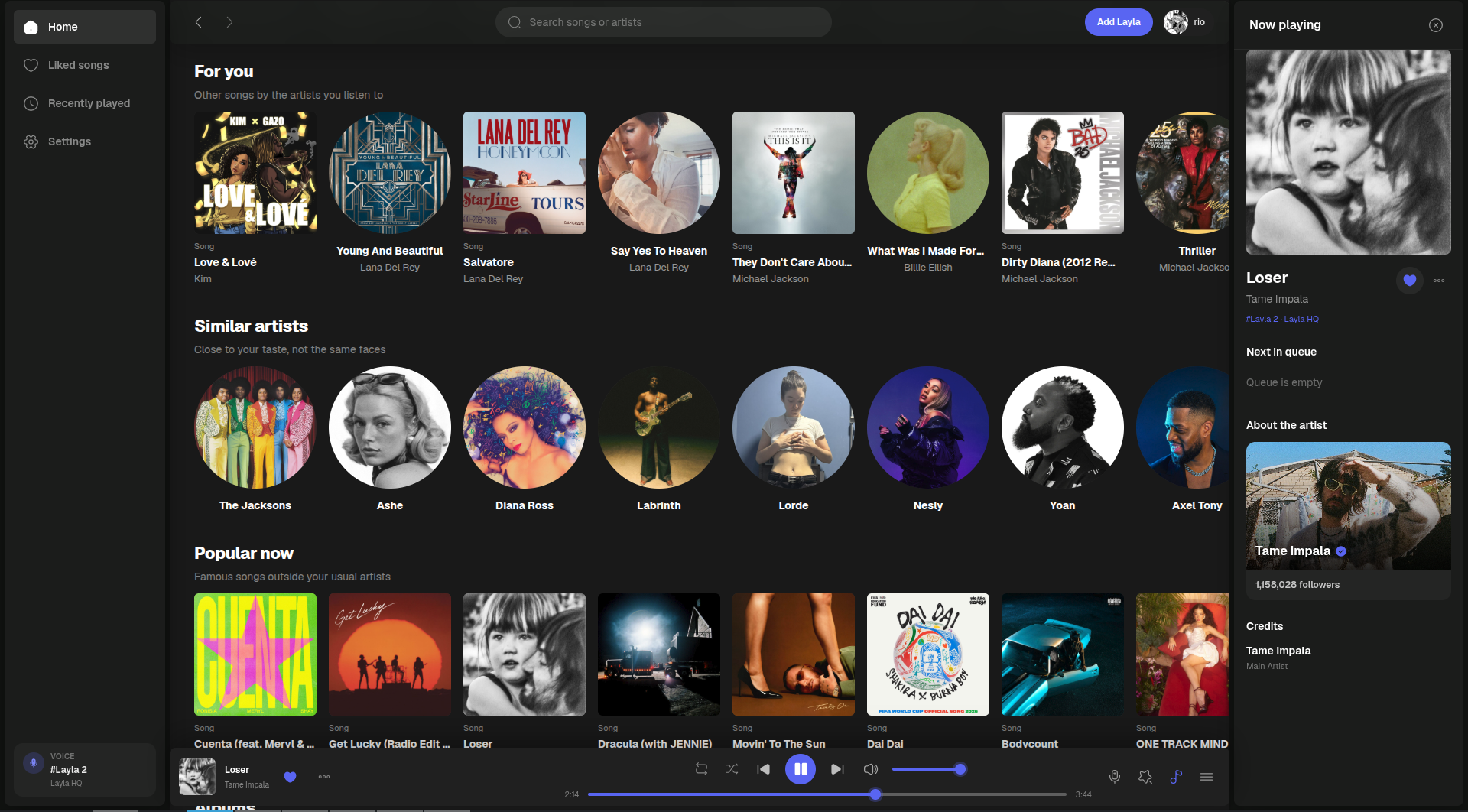
<img src=“https://laylaa.xyz/music.png” alt=“Layla music player” width=“800” />
</div>
<br />
Search the best songs. Listen from the site.Browse artists, queues, lyrics, and playlists in your browser while Layla plays in Discord voice.
<br />
From invite to musicLayla keeps every control inside Discord, so the whole server can start listening without learning a new app.
<table>
<tr>
<td width=“33%” valign=“top”>
<b>01 · Invite Layla</b><br /><br />
<b>One click setup</b><br />
Add Layla to your Discord server and choose the voice and text channels she can use. No dashboard or complicated setup required.
</td>
<td width=“33%” valign=“top”>
<b>02 · Pick a song</b><br /><br />
<b><code>/play</code> anything</b><br />
Type a song, artist, album, or paste a link. Layla finds the right track and joins your voice channel instantly.
</td>
<td width=“33%” valign=“top”>
<b>03 · Listen together</b><br /><br />
<b>Synced for everyone</b><br />
Build a shared queue, vote on what plays next, and control the session without leaving the conversation.
</td>
</tr>
</table>
<br />
Built for servers- 320kbps audio on a voice engine focused on stability
- 24/7 playback, even after the voice room empties
- DJ and role controls to restrict skipping and volume changes
- Spotify, YouTube, Apple Music, SoundCloud, Deezer and TIDAL
- Curated playlists like Billboard hits, indie and acoustic, in one command
<br />
Commands| Command | Description |
|---|---|
/play <song · artist · album · link> |
Play or queue music |
More at laylaa.xyz/commands.
<br />
<a href=“https://discord.com/oauth2/authorize?client_id=1545211018152644640&permissions=281749891582976&integration_type=0&scope=bot+applications.commands”><img src=“https://img.shields.io/badge/Invite Layla-5865F2?style=for-the-badge&logo=discord&logoColor=white” alt=“Invite Layla” /></a>
<a href=“https://discord.gg/b89aE9JkWW”><img src=“https://img.shields.io/badge/Join Support-000000?style=for-the-badge&logo=discord&logoColor=5865F2” alt=“Join Support” /></a>
<sub><a href=“https://laylaa.xyz/terms”>Terms</a> · <a href=“https://laylaa.xyz/privacy”>Privacy</a> · <a href=“https://laylaa.xyz/refund”>Refunds</a></sub>