
⚡ Trusted by 1000+ Discord servers!
✨MILLO DJ Features:
💡 Slash commands & control buttons
🚀 Support 24/7, YouTube, Spotify, SoundCloud, AppleMusic, Deezer, Bandcamp And Local file uploads
🤖 Built-in AI Assistant powered by Llama 70B, running on our dedicated home server for intelligent conversations, music assistance, server help, and more.
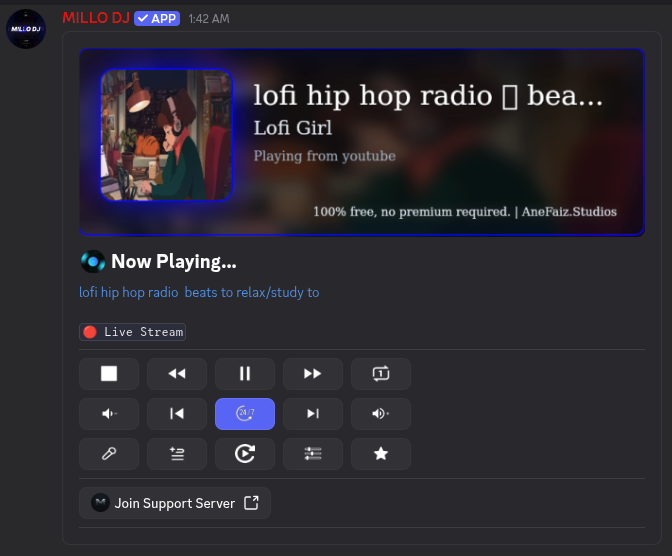
🎶 Playback Control
Stream your favorite songs from multiple platforms in high-quality audio. Take control using commands like
/play- Play a song or add it to the queue/playfile- Play a music file you upload/pause- Pause the current track/resume- Resume playback/skip- Skip to the next track/stop- Stop playback and clear the queue/nowplaying- Display currently playing track/queue- View the current queue
🔁 Smart Queue Control
Shape your perfect playlist on the fly with commands like
/shuffle- Shuffle the queue/clear- Clear the entire queue/remove- Remove a specific track from the queue/move- Move a track to a different position/back- Go back to the previous track/seek- Seek to a specific position in the track
🎵 Playlist System
Organize your favorite songs into playlist
/pl save- Save the current queue as a playlist/pl load- Load a saved playlist/pl list- View all your playlists/pl delete- Delete a playlist/pl rename- Rename a playlist/pl share- Share a playlist with others/pl import- Import a playlist from a link/pl track add- Add a track to a playlist/pl track remove- Remove a track from a playlist/pl track list- View tracks in a playlist
⭐ Favorite Songs
/favorite add- Add current track to favorites/favorite remove- Remove a track from favorites/favorite list- View all your favorite tracks/favorite play- Play a track from your favorites
🎚️ Audio & Settings
/volume- Adjust the volume/filter- Apply audio filters/loop- Set loop mode (off/track/queue)/autoplay- Toggle autoplay mode/247- Toggle 24/7 mode
📄 Instant Info at Your Fingertips
/help- Display help information/ping- Check bot latency/lyrics- Display lyrics for the current track
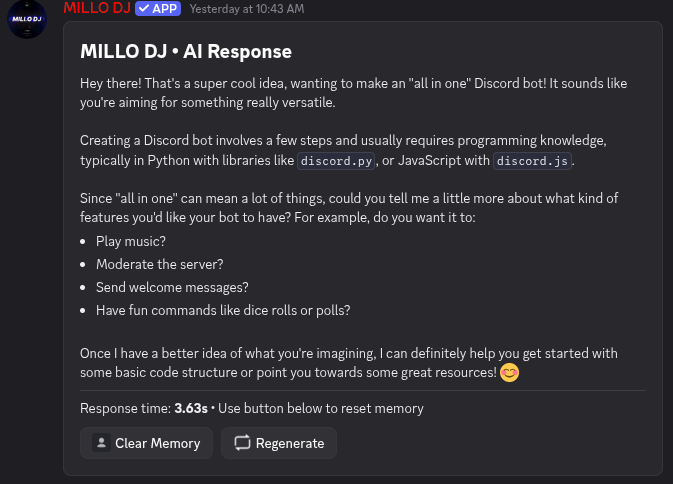
🤖 AI Assistant (Powered by Llama)
Experience an intelligent AI assistant built directly into MILLO DJ.
- Answer general questions
- Help with Discord server management
- Explain programming and technology topics
- Generate ideas, summaries, and translations
- Assist with music recommendations
- Fast responses powered by our self-hosted - - Llama 70B AI running on a dedicated home server
How to use? Tag @MILLO DJ— Ask the AI anything directly in Discord
Example:@MILLO DJ give me a creative story idea
Whether you’re chilling with friends, hosting a party, managing your Discord server, or chatting with an intelligent AI, MILLO DJ has everything you need in one powerful bot.
🎶 Music + AI Assistant + Powerful Features — Completely Free 100%
💬 join the MILLO DJ Support Server for discussion and help.