
ZeroBot builds, guards and runs your Discord server, all from one web dashboard. Describe the server you want and ZeroBot AI builds it. Anti-nuke and raid protection watch it. Tickets, moderation, logs and welcome messages run it. No config commands to learn.
ZeroBot is verified by Discord, and the dashboard speaks English, German, French, Spanish, Portuguese, Turkish, Polish and Italian.
Start in a minute- Add ZeroBot to your server.
- Open https://dash.zeropvp.xyz/?ref=dbl and sign in with Discord.
- Press Set up in 1 minute on the Get started card (or in
/help), pick what kind of server it is, and ZeroBot turns on welcome messages, logs, a spam filter and nuke protection, plus a ticket panel on a support server. It never overwrites what you set, and one Undo puts it all back.
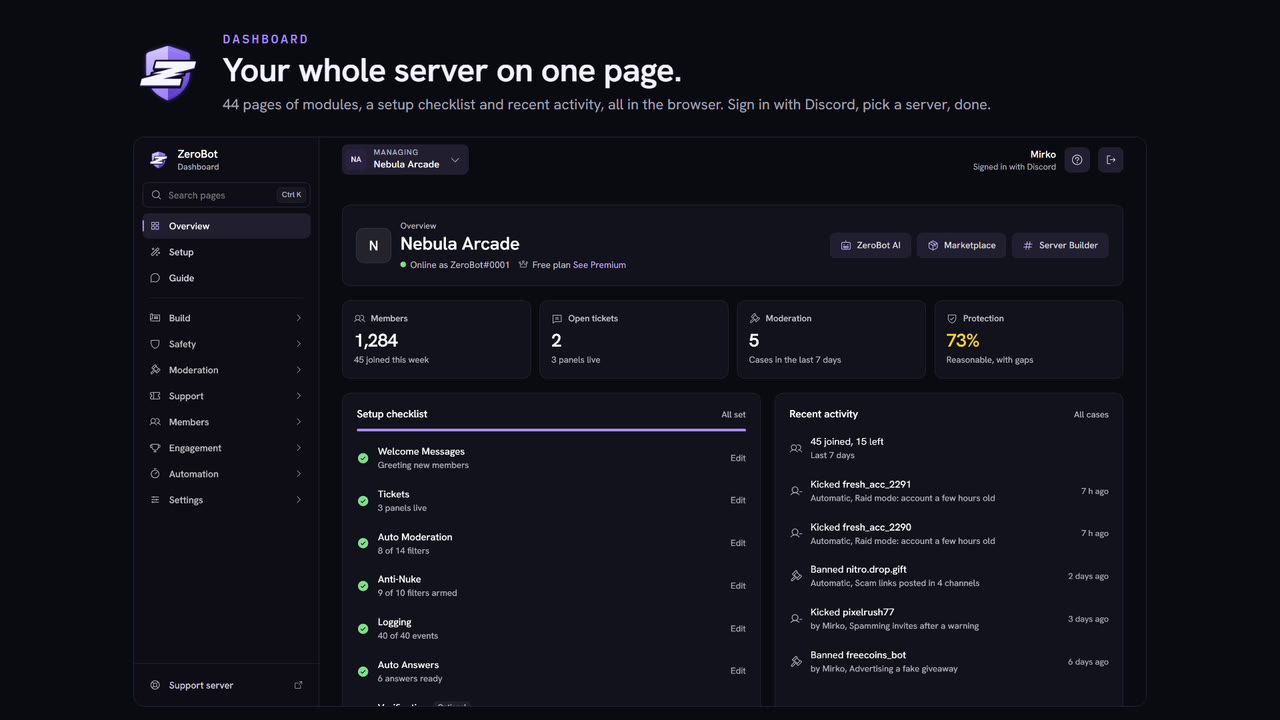
- A new dashboard look: glass panels, a light mode and a calm clean mode, on phones and tablets too.
- Server Studio: growth, engagement and moderation for your server, the way YouTube Studio shows a channel.
- Undo changes with message backup: rewind a change, or bring a deleted channel back with its messages.
- Shield Network: servers warn each other about accounts ZeroBot confirmed as harmful.
- What ZeroBot did: the Overview counts the raids stopped, actions taken and members welcomed in the last 30 days.
- Join roles you can count on: a role ZeroBot cannot give is named with the fix, and members who joined during a restart are caught up within minutes.
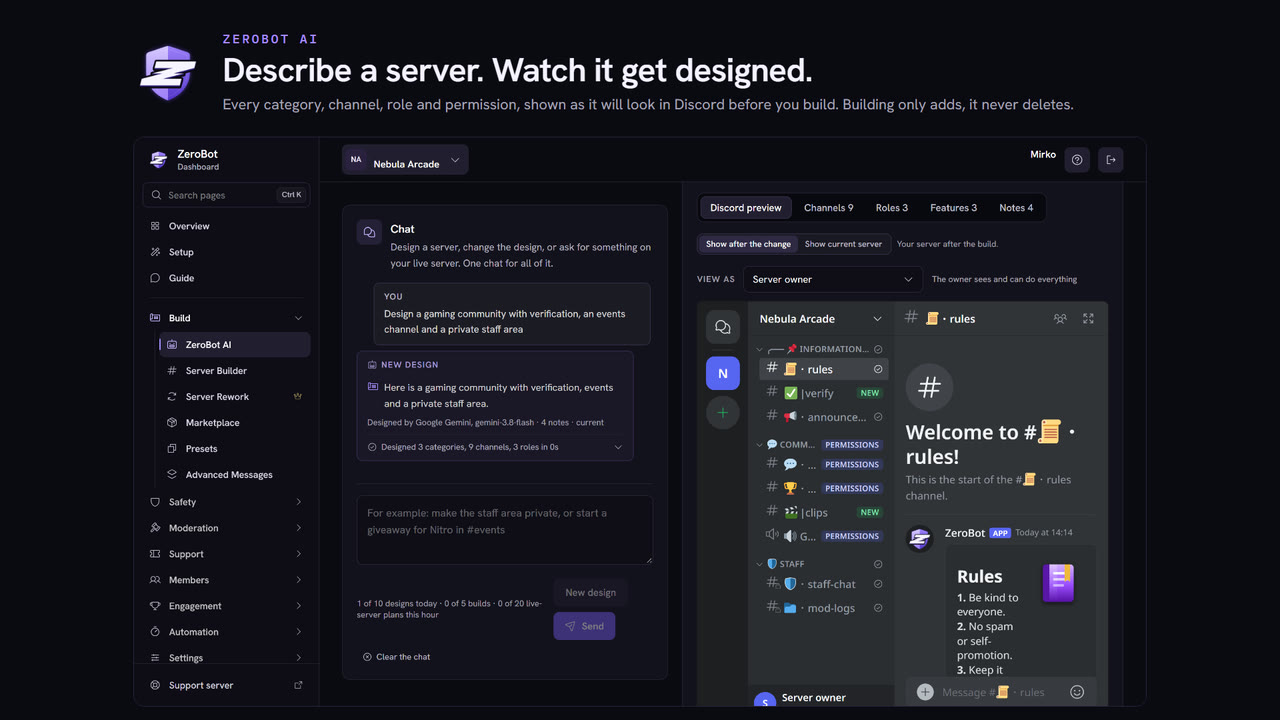
- ZeroBot AI: describe the server you want and it designs the categories, channels, roles and permissions. It also sets up modules such as tickets, verification, logs and welcome messages. You see an editable preview first, and nothing changes until you press Build.
- Server Builder: a complete server from a template (gaming, roleplay, esports, hangout, trading and more) in one click.
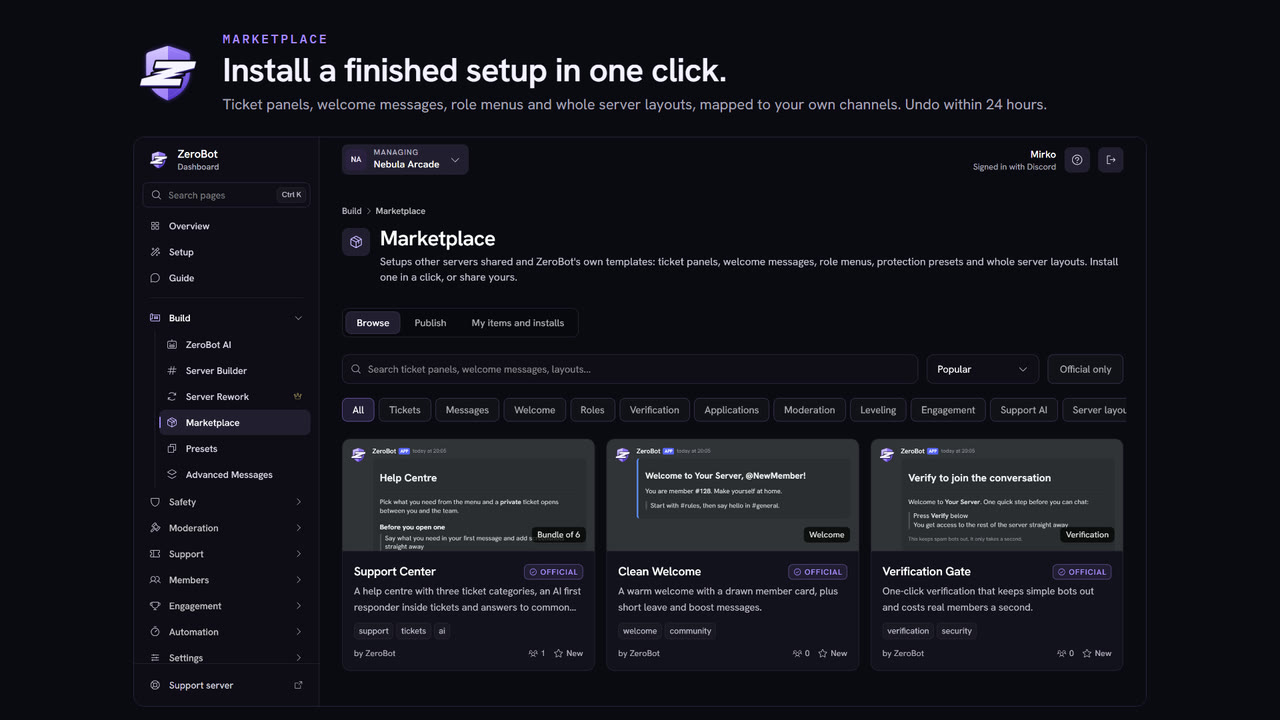
- Marketplace: install finished setups such as ticket panels, role menus, verification, protection presets or whole layouts. You map them to your own channels and roles, see a preview, and can undo an install for 24 hours. Browse it without signing in: https://dash.zeropvp.xyz/explore?ref=dbl
- Builds and installs only add things. ZeroBot does not delete channels or roles unless you confirm it.
- Anti-nuke: watches for mass channel and role deletions, mass bans, webhook spam and dangerous permission grants, and quarantines the account doing it.
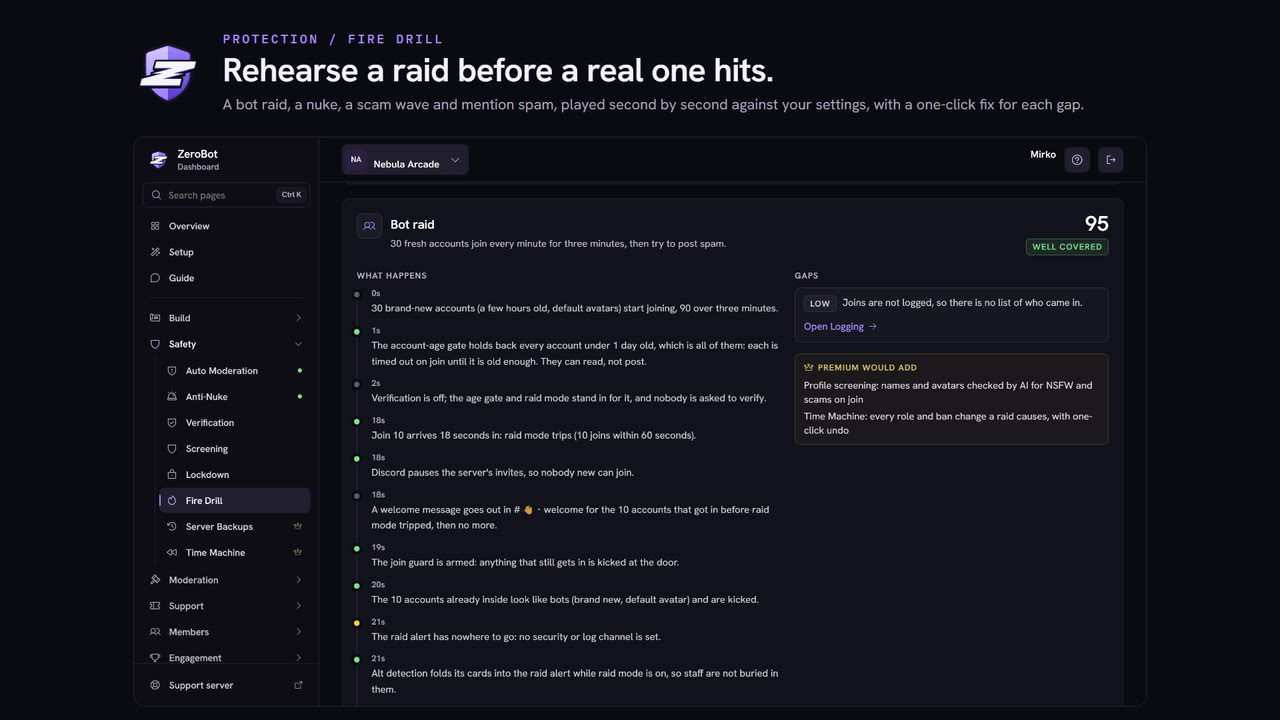
- Raid protection: raid mode pauses invites during a burst of joins, removes bot-looking accounts and lifts itself when it is quiet again.
- Verification with a button or a captcha, plus an account-age gate.
- Automod for spam, caps, invites and mass mentions, and AI moderation that rates messages, with Undo and False positive on every action.
- Honeypot channel, anti-impersonation for names that copy your staff, and bot approval: a newly added bot waits in quarantine until the server owner allows it.
- Security Center grades your settings,
/paniclocks the server in one step, and Fire Drill replays a raid against your settings without touching Discord. - Undo changes (Premium) records every change to channels, roles and permissions with who made it (7 days on Plus, 30 on Pro, 90 on Ultra), rewinds one change or everything after a point, and can put a deleted channel’s messages back.
- Shield Network: servers that opt in warn each other about accounts ZeroBot confirmed as harmful. Free posts a warning; Premium quarantines, kicks or bans them the moment they join.
- Slash commands:
/ban/unban/softban/kick/timeout/untimeout/purge/slowmode/lock/unlock/nick/role, warnings with/warn/warnings/unwarn, and the record with/case/note/history. - Every action becomes a numbered case with a mod log card, and most can be undone for 10 minutes.
- The Command Access page sets which staff roles may use each command.
- Logging for more than 40 event types, each to the channel you choose.
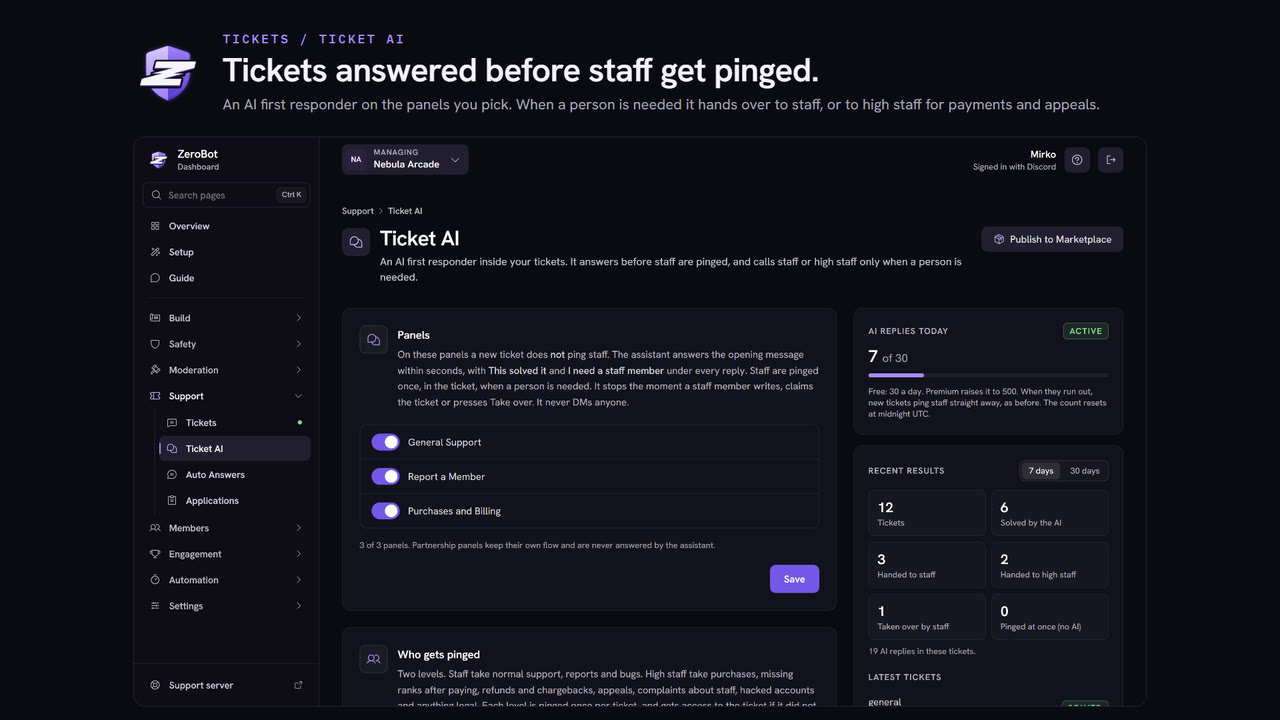
- Tickets: panels with buttons or a dropdown, multi-panels, claiming, transcripts and ratings. Ticket AI answers inside a ticket from your server info and hands over to staff with a short summary.
- Auto Answers reply to common questions in chat, such as where the rules are.
- Applications with up to 20 questions per position, and Forms for sign-ups and feedback.
- Message reports, Member 360 (everything about one member on one page) and Auto Promotions for staff.
- Welcome, leave and boost messages, reaction roles and self roles.
- Leveling with level roles, an economy with a shop you fill, giveaways, birthdays, invite tracking, reputation and mini games.
- Social alerts for YouTube, Twitch, Reddit and RSS.
- Scheduled and sticky messages, and Advanced Messages: a builder for Discord’s Components V2 layouts with buttons and pages.
- Automations: triggers, conditions and actions without code, with a dry run before anything goes live.
- Analytics for your server in the way YouTube Studio shows a channel: growth, engagement, community and moderation, with insights in plain words.
- The overview (28 days) is free. Every tab and 90 days of history come with Plus.
Free, with no Premium limit:
- welcome, leave and boost messages
- every log type and log channel
- reaction roles and self roles
- Advanced Messages
- ticket panels and multi-panels
- staff applications with up to 20 questions per position
- every moderation command and case type, warnings included
Free with a limit (the Premium limit in brackets):
- sticky messages and scheduled messages: 10 each (25 each)
- strict chat filter and profile screening, with 50 AI image checks a day (1,000)
- ZeroBot AI: 10 designs and 5 builds a day (60 and 25, plus actions on your live server)
- Ticket AI: 30 replies a day (500)
- Auto Answers: 15 entries (100)
- Automations: 5 (50)
- Forms: 3 (25)
- Premium is per server, in three plans: Plus, Pro and Ultra. Every server that adds ZeroBot for the first time gets ZeroBot Plus free for 5 days, once per server and owner account.
- Launch prices run until 30 November. Plans and prices: https://dash.zeropvp.xyz/premium?ref=dbl
- Premium raises the limits above and adds the exclusives: Bot Profile (ZeroBot’s own name, avatar, banner and bio on your server), Backups, Undo changes with message backup, AI answers before a ticket is opened, Server makeover (Pro) and dashboard theming.
- Referrals: when a new server adds ZeroBot through your server’s referral link, your server earns Premium days.
- No DMs to your members. Verification, tickets, warnings and automations stay in your server. The only direct messages are one welcome note to the person who adds ZeroBot and, if a server turns on bot approval alerts, a note to the server owner.
- The invite asks for Administrator only. If it is unticked, ZeroBot joins without permissions and lists what it is missing in its permission status card.
/helpexplains the modules and links the dashboard. It and the welcome card have an Invite ZeroBot button.- Dashboard sign-in only asks Discord who you are and which servers you manage.
- Dashboard: https://dash.zeropvp.xyz/?ref=dbl
- Premium plans: https://dash.zeropvp.xyz/premium?ref=dbl
- Marketplace: https://dash.zeropvp.xyz/explore?ref=dbl
- Guide: https://dash.zeropvp.xyz/guide?ref=dbl
- Status page: https://dash.zeropvp.xyz/status?ref=dbl
- Privacy policy: https://dash.zeropvp.xyz/privacy
- Terms: https://dash.zeropvp.xyz/terms
- Support server: https://discord.gg/7D9bwSf7Js